Pointers and "Auto apply the offset". Example of "Warcraft 3"


I am sure you have all heard about DMA by now. Understanding what this is and how to defeat it are the first steps of a mighty ladder. I shall try to tell you how DMA affects us without getting too much into technical detail. DMA also means direct memory address, which has nothing to do with cheating games that store data in dynamically assigned memory addresses.

When a game uses DMA, memory locations are allocated dynamically. The game grabs the next available slot of memory and gives it to whoever asked for it.

There are so many processes going on when a computer is running that it is very unlikely that the memory locations obtained on one occasion will be the same when the game is reloaded. This is why your tables only work just after the addresses are collected, but NOT after reloading. Once the game is reloaded, it will grab a NEW set of memory locations for itself, making your OLD set of memory locations useless.

To defeat DMA and create a table that will work 100% of the time, you need to come out of the realms of the NEWBIE and into the NEW LAND :)

Copyright (C) Advanced Game Training by [sheep] aka RECLAIM!

You can use it if you have found some valid addresses and one day they are not valid. You have to select one new address (in the left table) and old address (in the right table), and then click "Auto offset apply" in the context menu. ArtMoney finds Delta by the following method:

Delta = "New Address" - "Old Address".

Each address in the right table will be increased by this Delta. In fact, you have to get the table with real addresses.

For example, download the table "Warcraft 3 (hero)" from the ArtMoney website. Run ArtMoney and "Warcraft 3". Then, go to ArtMoney using Alt-Tab. Load this table and you will see:
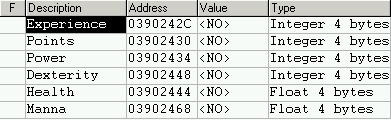


These are wrong addresses. Search for you hero experience (for example - 600). Kill anyone in the game, and experience grows to 650. Filter it. You get one address - 148607C1. Use "Auto apply the offset to all", or "Auto apply the offset to group" if you have a group.
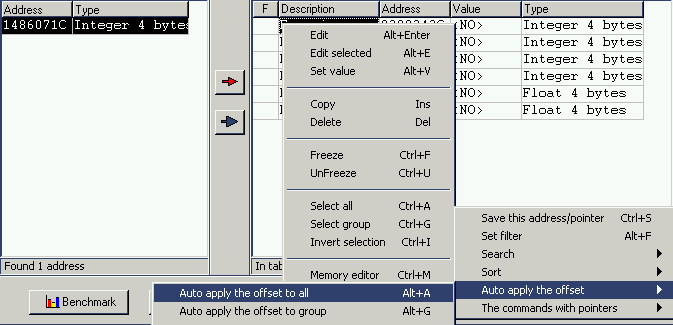


And now you see it
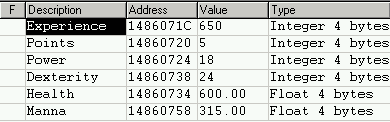


Cool, it works!

Pointer search works for Windows games with an executable file.

If you does not find a pointer then try to search for "Pointer to pointer" structure.

Addresses change every time after the restart of the game. But the game has to know where the value is now. The game has a special pointer to this address. The pointer contains the address of the value.


Address of the pointer does not change when the game is restarted. If the address stored in the table is a pointer, then we can get the real addresses of the values by following the pointer, even after restarting the game. Select the cell with Experience, then use "Search the pointer to this address". After that click "Set the pointer to all" or "to group".


Oops, we found nothing. That is because in this game, the pointer contains the "address of the structure", but we do not know where that structure begins. Select the cell with Experience again. Use the command "Search the pointer to beginning of memory block".


We found all the pointers between the beginning of the block and the address with Experience. There are 50 pointers.


Restart the game. Click "Filter" and enter the value of Experience - "650". Click "OK".


If there is more than one result after filtration, restart the game and repeat filtrations ("Pointer filtration"). Filter until the number of pointers will not decrease, select the cell in the right table with value 650, and use "Set the pointer to all".


Cool, it works! Now, this table work 100% of the time with any restart.


Pointer 6F71C7B8 contains address 01170088.
Address 01170088 is the address of the structure of our hero.
Address 01170088 plus offset 1684 equal 0117071C is the address of experience.
Address of experience is 1684 from the structure from pointer 6F71C7B8.
As a result, we have this table:
Pointer 6F71C7B8 + 1684 / Experience
Pointer 6F71C7B8 + 1688 / Points
Pointer 6F71C7B8 + 1692 / Power
Pointer 6F71C7B8 + 1712 / Dexterity
Pointer 6F71C7B8 + 1712 / Health
Pointer 6F71C7B8 + 1744 / Mana


  1. Save this address/pointer - save address/pointer/offset for later work
  2. Set the pointer to all (to group) - Select the Pointer cell (left table), and a relative cell (right table), then use this command. The address in the relative cell is matched to the Pointer cell in the left, and each new address in the right table is shifted by the original offset, relative to the old relative cell address. (Each address in the right table will be converted to this pointer with original offset).
  3. Set the saving pointer to all (to group) - same as above, except the new address is shifted by difference of current cell address and the address saved with 'Save this address/pointer' command. The new address is stored in the format of 'base address + offset', with base address equal to the address last saved with 'Save this address/pointer' command. And each offset will be increased by "saving offset".
  4. Set pointers to this address - All the pointers in the right table are set to the one address in the current field. This command changes the offsets only!
  5. Set pointers to saving address - same as above, except pointer is set to the last address set by the "Save this address/pointer" command.
  6. Convert pointers to addresses - It has the inverse effect of "Set pointer", but only applies to selected lines.
P.S. You can find a pointer like any other value. Search for it like for unknown value.
  1. Start the game. You have address of life - A1. Search "unknown value".
  2. Restart the game. You have life address of life - A2. Search "Was increased by (A2-A1)"
  3. Restart the game. You have life address of life - A3. Search "Was increased by (A3-A2)"
Finally, you will get the address of the pointer.
The offset = address of life (A3) - Value of pointer.
Back Contents Forward

Copyright (C) 1996-2011, System SoftLab
Last update of this page: May 2, 2011.