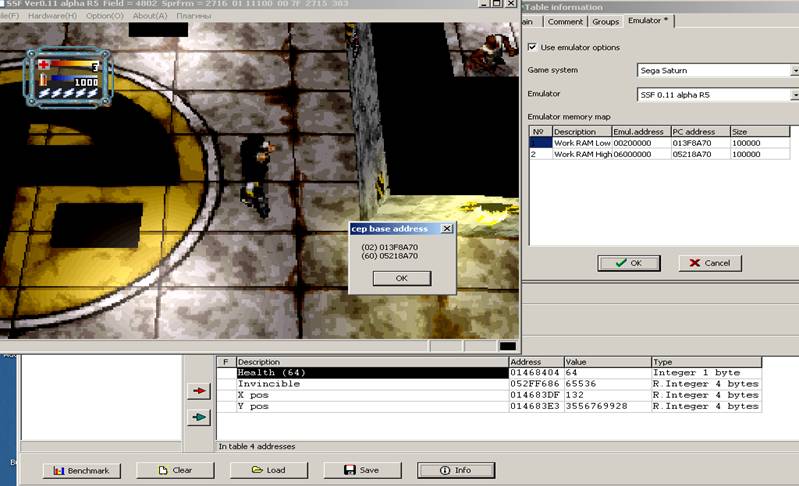
How to make
Sega Saturn emulator option
For
example, consider SSF 0.11 alpha R5
http://www7a.biglobe.ne.jp/~phantasy/ssf/files/SSF_011_alpha_R5.zip
Attention! Emulator "SSF" uses reverse bytes order. (Unlike emulator Yabause,
which uses the normal bytes order).
Also following
emulators uses reversed order of bytes:
Gamecube/Wii – Dolphin
3DO – FreeDO, FourDO
Genesis/Megadrive – Kega Fusion, Gens
Movie 11a/11b, and multisystem emulator Mednafen in
Genesis/SMD emulation mode
Sega Saturn
memory map:
00200000-002FFFFF : Work RAM Low
(1MB)
06000000-07FFFFFF : Work RAM High (1MB, mirrored every 1MB)
Also a memory map is available at this link:
http://cgfm2.emuviews.com/sat/sattech.txt
SSF emulator uses module addressing, as well as those emulators:
FinalBurn Alpha, FBA Plus, FBA Shuffle,
FBA-ReRecording new versions
Sega
Saturn – SSF
PSX – PSXjin, PCSX Reloaded
Gamecube/Wii –
Dolphin
GBA – VBA-RR, VBA-M etc,
Nes – FCEUX
SNES – SNES9X, SNES9X-ReRecording
DreamCast – NullDC, NullDC
Optimized
Sega Model 3 - Supermodel
You have to create emulator options with module
addressing for these emulators:
3DO – FreeDO, 4DO
Nintendo
Virtual Boy - VBjin
Multisystem
– MESS, MAME (Contains a debugger with memory editor that is useful to
find a zero addresses)
Other emulator options with pointer to zero address regularly tested for two
different Windows versions, if pointer
will not work on any version of Windows, it will also be converted to
a module addressing. We recommend to make new emulator options with
pointer to zero address with module addressing.
The following emulators without a pointer to zero address (speed access to memory is
faster without the pointer):, as well as those emulators:
Sony
PlayStation - ePSXe
DreamCast,
Sega Naomi 1/2, Sammy Atomiswave – Demul (zero address fixed at 2C000000)
Nintendo
DS - DeSmuME
SNES – Bsnes, ZSNESWin
Nes – VirtualNes (older versions), puNes, Bsnes, Nintendulator 0.975 beta
9-12-11
Nintendo
64 – 1964, emu-1964, (zero address fixed at 20000000)
PC
Engine/Turbografx/CD – Mednafen,
PCEjin
Arcade
emulator ZiNc (Capcom
ZN1/ZN2 based on PSX hardware)
Wonderswan Color, NeoGeo
Pocket/Color - Mednafen
Killer
Instinct 1/2 – Ultra64 emu
Atari
Jaguar – Jagulator
Atari
8-bit, Atari 5200 - Altirra
and others
Emulators with “Pointer-to-pointer structure” -
Sega Model 2 emu (thanks to ArtMoney
developers) , GB/GBC emulator TGB Dual, Multisystem emulator
Mednafen in Atari Lynx emulation mode, and Atari ST
emulator SainT.
ArtMoney can select emulator options automatically when loading of ArtMoney
table. You can view MD5 file hash in "Process Information" window.
Start any game in the SSF emulator. Next, open the Process Information and check MD5 hash

You
have to copy the MD5, if you want that ArtMoney
selects emulator options
automatically.
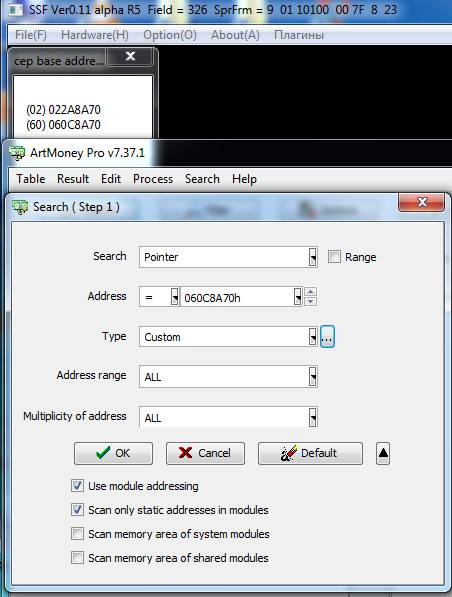
We can view the zero addresses of both RAM blocks by simple
click of the mouse in SSF, just click the tab Aboгt –> cep. Next,
run the search for pointer
to the zero address of the first memory block (WorkRAM
Low) with a module addressing - note “Use module addressing” and “Scan
only static addressess in modules”when searching.:
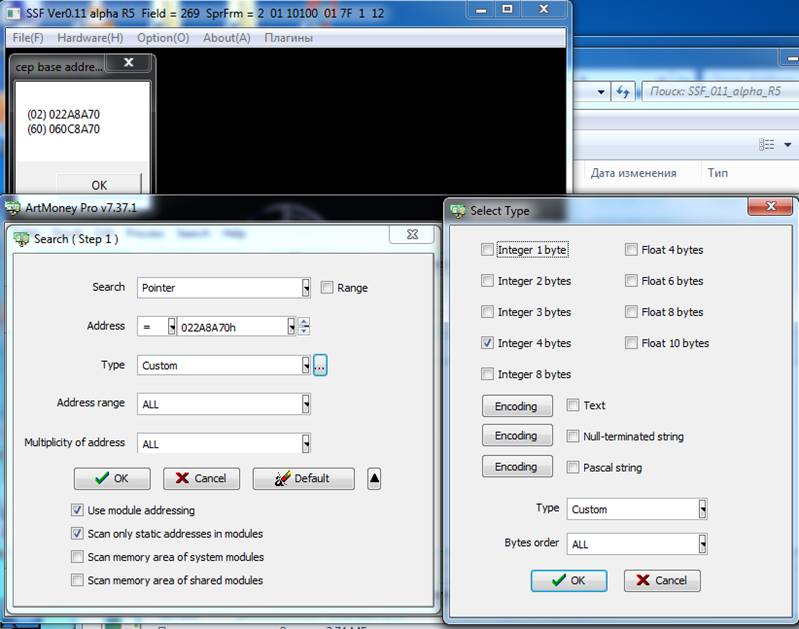
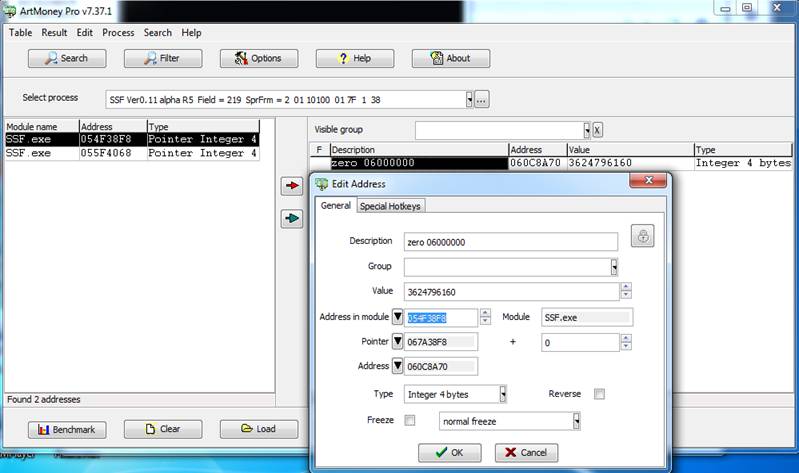
We have get two pointers in the SSF.EXE module. Then
restart the emulator (or Windows is better), open About – cep again
and filter to the
new zero address to the first block. In this
case it has not changed:
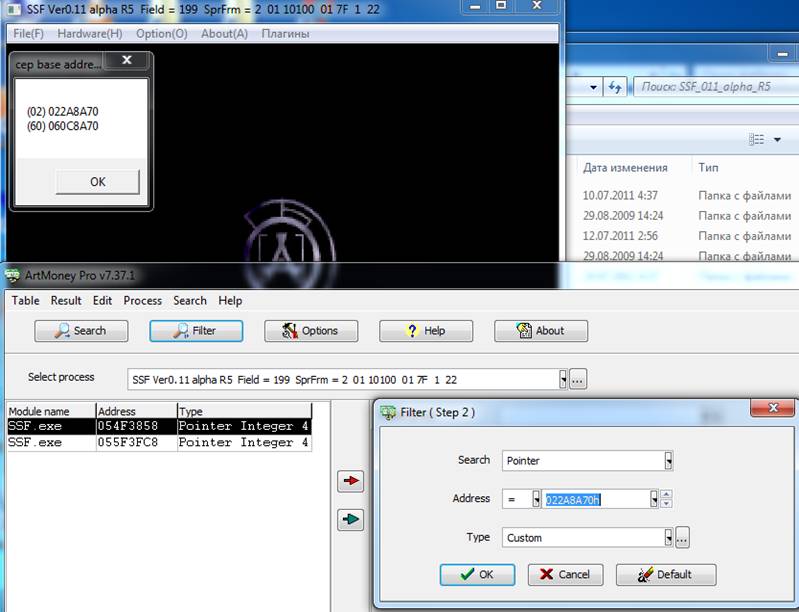
We
still have two pointers after filtering. If you filtered pointers after
restarting Windows, then you don't need filter it more. If you filtered
pointers after restarting emulator, then
filter it one more time.
Then take the first pointer, RMB – Edit. We need address in module:
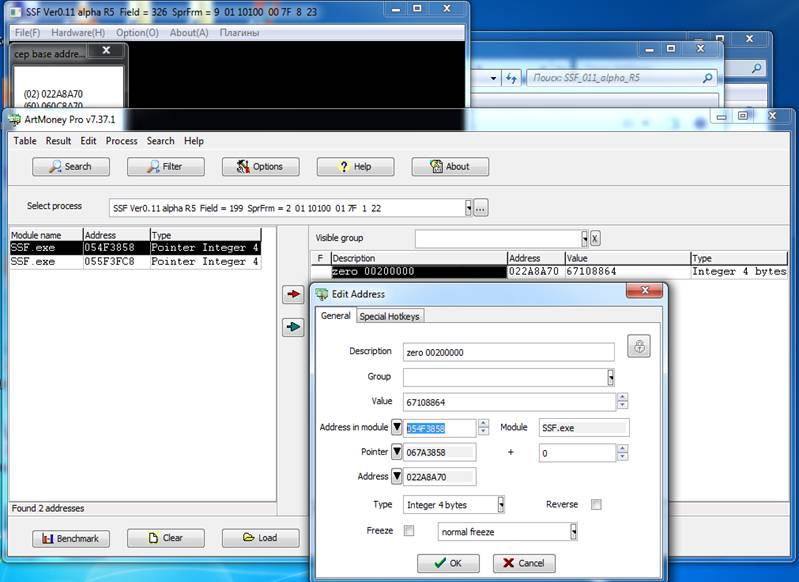
Get option to the first block
SSF 0.12 alpha R5;SSF.exe;19a1439454dc5348e4480260ddb5bb44
;Work RAM Low 1Mb;00200000;SSF.EXE+P054F3858;100000
Then follow the same procedure to find a pointer to the second memory block
(Workram High):
As a result, we obtain the emulator option:
SSF 0.12 alpha R5;SSF.exe;R;19a1439454dc5348e4480260ddb5bb44
;Work RAM Low 1Mb;00200000;SSF.EXE+P054F3858;100000
;Work RAM High 1Mb;06000000;SSF.EXE+P054F38F8;100000
Emulator option contains a version of the emulator, EXE file name, MD5 checksum, bytes order, emulator virtual zero address (base address, start
of RAM, RAM base), and
a module name, address in module/pointer and size of this memory area.
For an example – emulator option without pointer (only zero address)
Genesis/SMD:
Gens 2.14;gens.exe;N;256805adeaac3a7ed7f9eb96a0ad5c77
;RAM 64Kb;FF0000;005B4FC0;10000
Emulator
option with pointer (no module addressing):
Genesis/SMD:
KegaFusion 3.64;Fusion.exe;R,c7c149e7621e9152af1f672567d606b4
;RAM 64Kb;FF0000;P006A52D4;10000
Emulator
option with pointer-to-pointer structure – module name, address in module, offset 1, offset 2:
Sega
Model 2
Model 2 Emulator 1.0;emulator.exe;N;7094fa0b4b8e35d687eaa8b1adc32bba
;WorkRAM 1Mb;500000;emulator.exe+P0018F930,100h,0;100000
It's
necessary to test
emulator
option on games
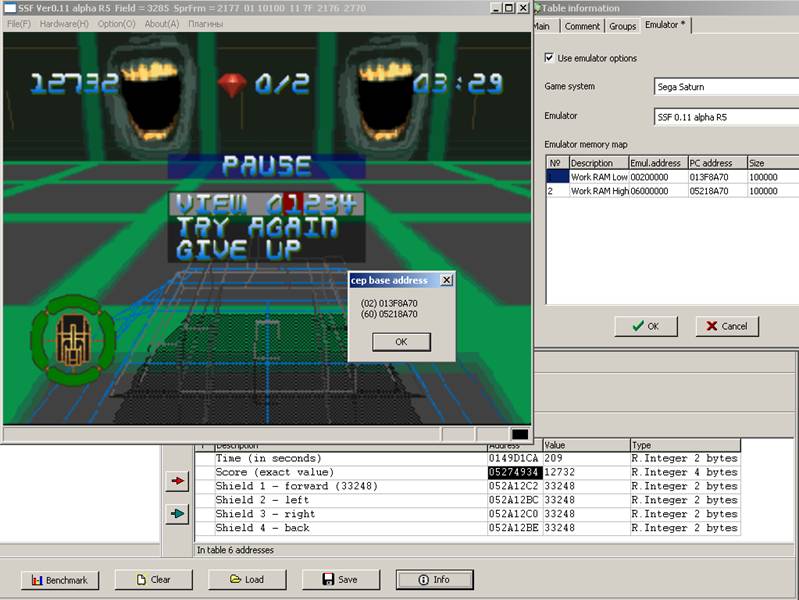
in two different Windows versions. I made
this emulator option in Windows 7 , check the option on the XP SP3
Asault Rigs:
Loaded
(PAL: